FAQ
地址转换
geoip2 对应的数据库下载 https://www.maxmind.com/en/account/sign-in java api https://maxmind.github.io/GeoIP2-java/
MySQL
MySQL超时问题
Linux问题
Linux 修改ip地址
对于的配置文件
cd /etc/sysconfig/network-scripts

vi ifcfg-ens33
要修改的配置项
BOOTPROTO="static" | 如果是dhcp获取,BOOTPROTO="dhcp" ,下面的配置都不需要

IPADDR=172.16.7.237
NETMASK=255.255.255.0
GATEWAY=172.16.7.1
DNS1=114.114.114.114
DNS2=8.8.8.8
重启网络服务
systemctl restart network
查看网关地址
[root@localhost network-scripts]# ip route show
default via 172.16.7.1 dev enp0s3 proto dhcp metric 100
172.16.7.0/24 dev enp0s3 proto kernel scope link src 172.16.7.237 metric 100

172.16.7.1 就是网关
ssh-copy-id 配置免密以后无效的问题
Authentication refused: bad ownership or modes for directory
参考博客
https://blog.csdn.net/weixin_42559574/article/details/129943394
https://blog.csdn.net/andyguan01_2/article/details/100658905
查看安全相关的日志
sudo cat /var/log/secure
发现是免密文件的权限问题引起的,权限的文件是有一定的规定的不是越高越好,这个也算是linux的自我保护机制吧
chmod 600 /home/bigdata/.ssh/authorized_keys
chown bigdata:bigdata /home/bigdata/.ssh/authorized_keys
ls -l /home/bigdata/.ssh/authorized_keys
chmod 700 /home/bigdata/.ssh
chown bigdata:bigdata /home/bigdata/.ssh
ls -ld /home/bigdata/.ssh
chmod 755 /home/bigdata
chown bigdata:bigdata /home/bigdata
ls -ld /home/bigdata
chmod 600 /home/bigdata/.ssh/id_rsa
ls -l /home/bigdata/.ssh/id_rsa
知道端口查询进程号
sudo lsof -i :9090
linux 百万连接问题
linux 修改 yum 源和 epel 源
修改yum源
mkdir /etc/yum.repos.d/backup/
mv /etc/yum.repos.d/CentOS-Base.repo /etc/yum.repos.d/backup/
curl -o /etc/yum.repos.d/CentOS-Base.repo http://mirrors.aliyun.com/repo/Centos-7.repo

sed -i -e '/mirrors.cloud.aliyuncs.com/d' -e '/mirrors.aliyuncs.com/d' /etc/yum.repos.d/CentOS-Base.repo

yum clean all
yum makecache
修改epel源
yum --nogpgcheck -y install epel-release

mv /etc/yum.repos.d/epel* /etc/yum.repos.d/backup/

curl -o /etc/yum.repos.d/epel.repo http://mirrors.aliyun.com/repo/epel-7.repo

yum makecache
相关地址
https://odinxu.com/post/accelerate-centos-yum-dnf/
大数据算法
Uber H3算法
相关博客
民间资料
大数据
大数据指标体系
Flume
Upsert-kafka-demo
后端
技术选型
https://segmentfault.com/a/1190000023467005?utm_source=sf-similar-article
JAVA知识体系
PostgreSQL
https://segmentfault.com/a/1190000044048598?utm_source=sf-similar-article
机器学习
零度解说
跨境电商
爬虫谷歌驱动安装
https://cuiqingcai.com/33043.html https://googlechromelabs.github.io/chrome-for-testing/ https://www.cnblogs.com/laoluoits/p/17710501.html
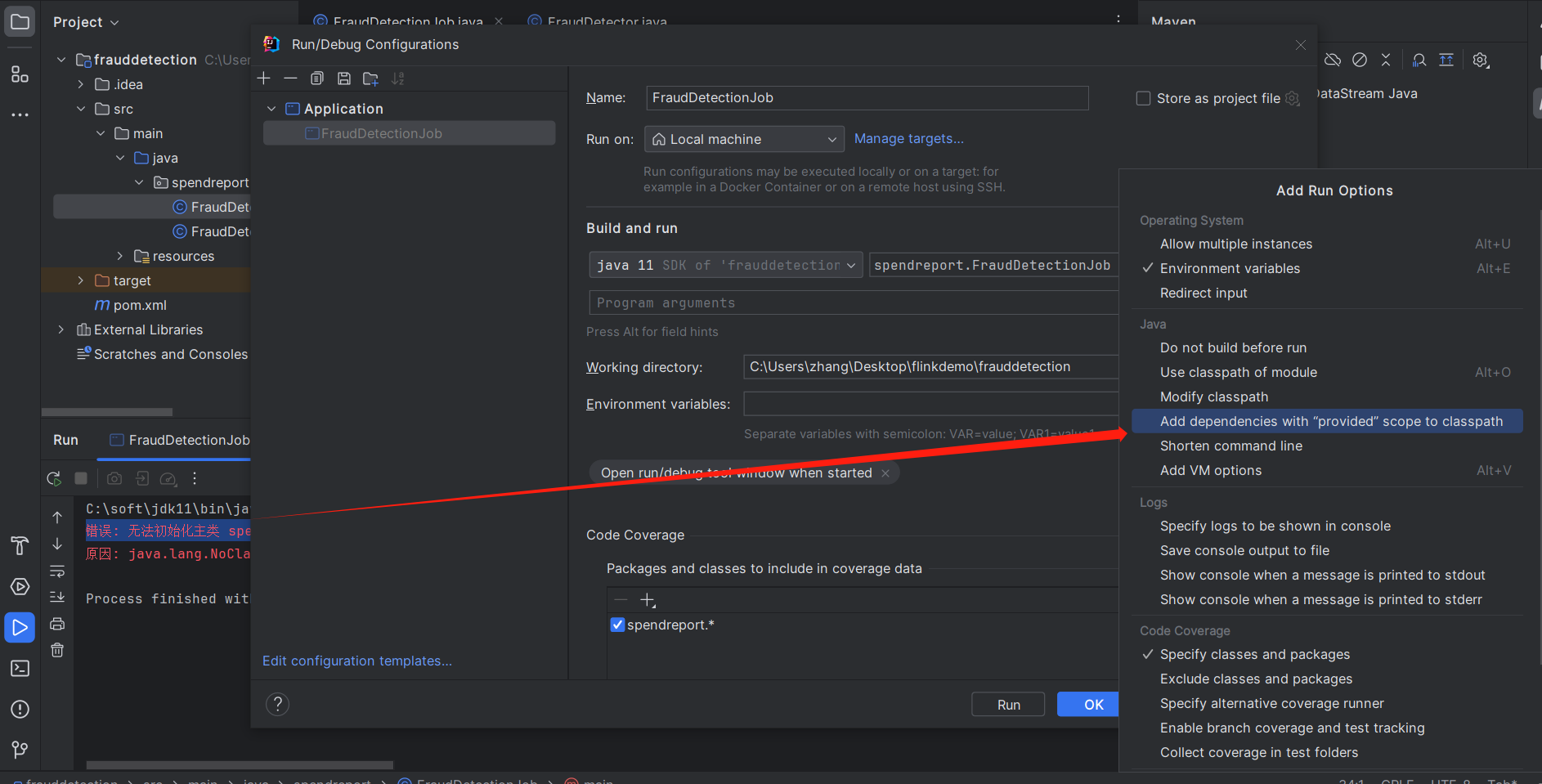
Flink错误
错误: 无法初始化主类 spendreport.FraudDetectionJob
若依相关修改
前端启动修改
package.json
  "scripts": {
    "dev": "set NODE_OPTIONS=--openssl-legacy-provider && vue-cli-service serve",
    "build:prod": "vue-cli-service build",
    "build:stage": "vue-cli-service build --mode staging",
    "preview": "node build/index.js --preview",
    "lint": "eslint --ext .js,.vue src"
  }
图标
mybatisplus
ruoyi-common 的修改
    <properties>
        <mybatis-plus.version>3.4.3</mybatis-plus.version>
    </properties>
 <!-- mybatis plus -->
 <dependency>
      <groupId>com.baomidou</groupId>
      <artifactId>mybatis-plus-boot-starter</artifactId>
      <version>${mybatis-plus.version}</version>
  </dependency>

  <!-- pagehelper 分页插件 -->
  <dependency>
      <groupId>com.github.pagehelper</groupId>
      <artifactId>pagehelper-spring-boot-starter</artifactId>
      <version>${pagehelper.boot.version}</version>
      <exclusions>
          <exclusion>
              <groupId>org.mybatis</groupId>
              <artifactId>mybatis</artifactId>
          </exclusion>
      </exclusions>
  </dependency>
application.yml的修改
# MyBatis配置
mybatis-plus:
    # 搜索指定包别名
    typeAliasesPackage: com.ruoyi.**.domain
    # 配置mapper的扫描,找到所有的mapper.xml映射文件
    mapperLocations: classpath*:mapper/**/*Mapper.xml
    # 加载全局的配置文件
    configLocation: classpath:mybatis/mybatis-config.xml
MyBatisPlusConfig 的修改
@Configuration
public class MybatisPlusConfig {

    /**
     * 新的分页插件,一缓和二缓遵循mybatis的规则,需要设置 MybatisConfiguration#useDeprecatedExecutor = false 避免缓存出现问题(该属性会在旧插件移除后一同移除)
     */
    @Bean
    public MybatisPlusInterceptor mybatisPlusInterceptor() {
        MybatisPlusInterceptor interceptor = new MybatisPlusInterceptor();
        //分页
        interceptor.addInnerInterceptor(new PaginationInnerInterceptor(DbType.MYSQL));
        //乐观锁
        interceptor.addInnerInterceptor(new OptimisticLockerInnerInterceptor());
        return interceptor;
    }
}
多数据源配置
<dependency>
  <groupId>com.baomidou</groupId>
  <artifactId>dynamic-datasource-spring-boot-starter</artifactId>
  <version>${version}</version>
</dependency>
spring:
  datasource:
    dynamic:
      primary: master #默认主库名为master
      strict: false #不使用严格模式
      datasource:
        master:
          url: jdbc:mysql://127.0.0.1:3306/master
          username: root
          password: 66668888
          driver-class-name: com.mysql.jdbc.Driver
        slave_1:
          url: jdbc:mysql://127.0.0.1:3307/slave_1
          username: root
          password: 66668888
          driver-class-name: com.mysql.jdbc.Driver
        slave_2:
          url: ENC(xxxxx) # 内置加密
          username: ENC(xxxxx)
          password: ENC(xxxxx)
          driver-class-name: com.mysql.jdbc.Driver
然后mapper加入注解就可以了
@DS("slave")
public interface TFlinkAppMapper extends BaseMapper<TFlinkApp> {

}